Languages & Translation
Can I post in a language other than English?
Yes. You are welcome to post in any language. Other members can use the Translate link that appears beneath your post to read it in their own language.
How do I translate a post written in another language?
When a post is written in a language that differs from your interface language, a Translate link appears beneath it. Click it and the translated text replaces the original in-page. To see the original again, click Show original.
Note: the Translate link does not appear on posts already written in your interface language.

Does translation happen automatically?
No. Translation is on-demand—you trigger it yourself by clicking the Translate link on an individual post. Posts are not translated automatically when you open a topic.
How do I change the forum's interface language?
The forum interface—menus, buttons, navigation—can be displayed in over 49 languages. To change it:
-
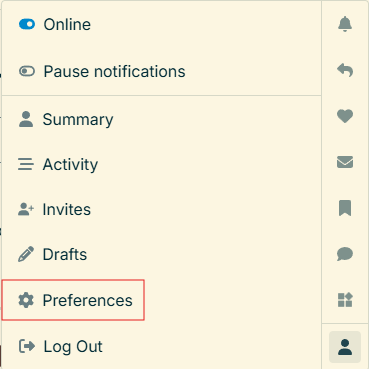
Click your profile avatar (highlighted below).

-
This opens a menu—select Preferences (highlighted below).
- Go to the Interface tab.
-
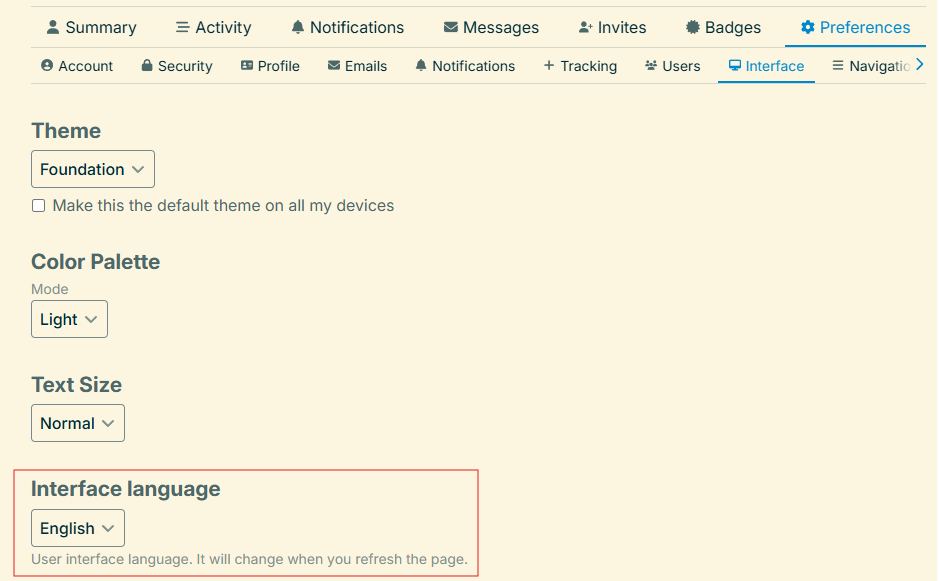
Choose your language from the Interface Language dropdown (highlighted below).
- Click Save Changes.
What is the difference between the interface language and post translation?
These are two separate features. The interface language controls how the forum's menus and buttons appear to you—it does not affect post content. Post translation converts the text of an individual post into your language on demand. Posts are always stored in the language they were originally written in.
Why don't I see a Translate link on some posts?
The Translate link only appears when a post is detected as being in a language different from your current interface language. If a post is written in the same language as your interface setting, no Translate link is shown—no translation is needed.
Still have questions? Contact us at staff@wmea-world.org and we will help.